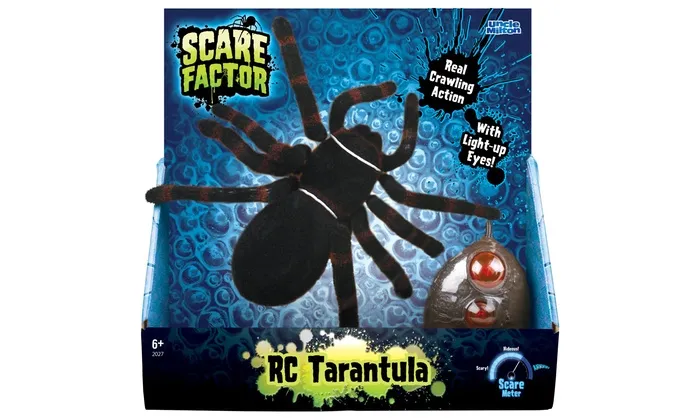
Diagnosing Your Remote Control Tarantula
A non-functional remote control tarantula can be frustrating, but often the fix is straightforward. Before you start, ensure you have a screwdriver, fresh batteries, and possibly a small brush or cotton swab. This guide will help you systematically diagnose and resolve common issues that prevent your RC tarantula from working. Start by taking a deep breath and not panicking. Many problems are due to easily fixable issues such as low batteries or incorrect pairing of the remote with the toy. Begin the diagnosis by examining the most common culprits, and proceed methodically to identify and resolve the issue. These steps are designed to save you time and avoid unnecessary repairs or the need for a replacement. With a little patience, you will have your remote control tarantula crawling again.
Check the Batteries
The most frequent reason for a non-operational RC tarantula is drained batteries, in both the toy and the remote. This step involves verifying the power source for both components. Even if the tarantula or remote seems to have worked recently, batteries can deplete quickly, especially with heavy use or if the toy has been stored for a period. The type and number of batteries needed will vary depending on the model of your remote control tarantula, so make sure that you have the correct replacements on hand. Using the wrong type of batteries can lead to a variety of issues, including the tarantula not working, or even damaging the electronic components within the toy. Always use fresh, high-quality batteries to ensure optimal performance and longevity.
Inspect the Tarantula’s Batteries

Carefully open the battery compartment on the tarantula itself, usually located on the underside. Remove the existing batteries, noting their orientation (+ and -). Use a small screwdriver if needed, but avoid over-tightening screws. Examine the batteries for any signs of leakage or corrosion, which indicates the batteries have been compromised and may have damaged the contacts. If any damage is present, clean the battery compartment using a cotton swab dipped in a small amount of rubbing alcohol, after ensuring the tarantula is turned off and disconnected from any power source. Insert fresh batteries, matching the polarity markings inside the compartment. Close the battery compartment securely and try turning on the tarantula.
Check the Remote’s Batteries
Similar to the tarantula, open the battery compartment on the remote control. Check the remote for any signs of physical damage or battery leakage. Remove and inspect the batteries for any visible damage or corrosion. Replace them with fresh batteries, again observing the correct polarity. Ensure that the battery compartment lid is securely closed to maintain a good connection and prevent the batteries from falling out during use. Test the remote by pressing the control buttons to see if the power light or indicator lights up. If the light doesn’t activate or appears dim, the remote batteries are likely the problem. If the remote is working the next step is to investigate the pairing with the tarantula.
Battery Contact Corrosion
Corrosion on battery contacts can prevent a good electrical connection, even with new batteries. This can occur in both the tarantula and the remote control. Inspect the battery contacts for a white or greenish residue, which is a sign of corrosion. Use a cotton swab dipped in white vinegar or rubbing alcohol to gently clean the contacts. Avoid using excessive liquid; the swab should be damp, not dripping. After cleaning, allow the contacts to dry completely before reinserting the batteries. Ensure the contacts are free of any debris or corrosion before attempting to power on the device again. Regular inspection and cleaning can prevent this issue and extend the life of your toy.
Understanding the Remote Control

Familiarize yourself with the remote control’s functions and features. Understand the power switch location, as well as the directional controls and any special function buttons. Many remote control tarantulas have multiple speeds or modes, so ensure you’re familiar with how to select the desired settings. Ensure the remote is turned on and the power indicator light is illuminated when in use. If the remote has a pairing button, understand its function. Some remotes utilize infrared, and for these, make sure that the sensor on the tarantula is not obstructed. Understanding how your remote works is the first step towards troubleshooting. If the remote is not working and the battery is not the problem, it is possible the remote is broken, and you might need to purchase a new one.
Check the Power Switch and Connection
Make sure the power switch on both the tarantula and the remote control is in the ‘on’ position. It might seem obvious, but it’s a common oversight. Double-check the position of the switch to ensure it is fully engaged. Inspect the connection between the batteries and the contacts inside the battery compartment. Sometimes the contacts can be slightly bent, which might interrupt the connection. If necessary, gently adjust the contacts to ensure they make proper contact with the batteries. A weak power connection is one of the most common issues. This can be resolved by inspecting and if needed replacing the power switch, or inspecting for corrosion.
Range and Obstacles
Remote control tarantulas typically have a limited operational range. Make sure you are operating the tarantula within the specified range indicated in the product’s manual. Walls, furniture, and other objects can interfere with the signal between the remote and the tarantula. Try operating the tarantula in an open area, free of obstructions. If you are operating it indoors, be mindful of any obstacles that might block or interfere with the signal. For those using infrared remotes, ensure there is a clear line of sight between the remote and the tarantula. Avoid operating the tarantula near sources of interference, such as other remote control toys or electronic devices.
Pairing the Tarantula and Remote

Many RC tarantulas need to be paired with the remote control before they can operate. This process establishes a unique communication link between the remote and the toy. Refer to the product manual for specific instructions on how to pair the remote and the tarantula, as the process varies. Generally, this involves turning on both devices and pressing a pairing button on either the remote or the tarantula, or both. The pairing process might be indicated by a flashing light or a specific sound. If the devices aren’t paired, the remote control won’t be able to send signals to the tarantula. Ensure that both devices are in close proximity during the pairing process to facilitate a successful connection. If you are unsure about how to proceed consult the product manual.
Resetting the Remote and Tarantula
If pairing doesn’t work, try resetting both the remote and the tarantula. Turn off both devices and remove the batteries. Wait a few minutes before reinserting the batteries and turning them back on. Then, repeat the pairing process as outlined in the product manual. Sometimes, a simple reset can resolve communication glitches. This step is especially useful if the tarantula worked previously but has stopped responding. It clears any temporary memory errors that may have occurred, restoring the devices to their initial state. If you still have issues it may be a hardware issue in either the remote or the toy, and the next steps are to check the legs and motors of the toy.
Mechanical Issues and Solutions
Mechanical problems can also prevent an RC tarantula from working. Issues with the legs or the internal motor can cause the tarantula to be unresponsive or move erratically. Visual inspection and physical examination can help identify these problems. Often a simple fix is all that is required, and it is not required to be an expert technician to diagnose these issues. If you are more comfortable, it may be more useful to take the toy to a repair shop. However, usually the problems are low level and can be resolved at home.
Examine the Legs and Movement Mechanisms

Inspect the tarantula’s legs for any obstructions or damage. Make sure no debris, such as hair or small objects, is caught in the gears or joints. If you find any obstructions, carefully remove them. Check the legs for any signs of damage, such as broken or bent parts. If the legs are damaged, replacement parts might be needed. Test the legs by manually moving them to see if they move freely. Sometimes a leg or two may become dislodged. If the legs do not move smoothly, lubricate the joints with a small amount of silicone-based lubricant, if recommended by the manufacturer. This will help reduce friction and improve the legs’ movements.
Motor Problems and Replacement
The motor is what powers the tarantula’s movements. If the legs appear to be working correctly but the tarantula still doesn’t move, the motor might be faulty. Listen for any unusual noises coming from the motor when you try to operate the tarantula. Disassemble the tarantula to access the motor. Check the motor’s wiring connections to ensure they are secure. If the motor is not functioning correctly, a replacement may be necessary. Replacement motors are often available online or through the manufacturer. Follow the manufacturer’s instructions to replace the motor, or you can take the tarantula to a repair shop if you aren’t comfortable doing the repair yourself. Replacing the motor is often a more involved process than other troubleshooting steps.
Troubleshooting Wireless Interference
Wireless interference can disrupt the signal between the remote control and the tarantula, leading to erratic or unresponsive behavior. Sources of interference include other remote control toys, wireless routers, and electronic devices. Try operating the tarantula in a different location, away from potential sources of interference. If possible, test the tarantula in an open area with minimal electronic devices. Some RC toys operate on specific frequencies. Other toys on the same frequency can cause interference. Check the frequency of both the remote and the tarantula, and if possible, switch to a different frequency to avoid interference. Interference can be a tricky thing to diagnose and you may have to try multiple locations.
Other Potential Issues
Besides the common issues, other problems can cause your RC tarantula to malfunction. These may include internal wiring issues, faulty circuit boards, or damage to the antenna. These problems can be more difficult to diagnose and often require specialized knowledge or tools. However, it is not difficult to determine that there is a more significant issue, and at this point it may be best to take the toy to an expert.
Software Glitches and Firmware Updates
Some RC tarantulas have software or firmware. Although rare, software glitches can affect functionality. Check the manufacturer’s website to see if there are any available firmware updates for your model. If updates are available, follow the instructions to update the tarantula’s software. This might involve connecting the tarantula to a computer. Make sure to back up any important data before you begin. If the software has bugs or other issues you may need to update, but this is not very common.
Contacting Customer Support
If you’ve tried all the troubleshooting steps and your remote control tarantula still doesn’t work, it’s time to contact customer support. Locate the manufacturer’s contact information. Provide a detailed description of the problem and the steps you’ve already taken. Include the model number of the tarantula. Customer support may offer additional troubleshooting tips or provide instructions for returning the product for repair or replacement. Customer support can give you a lot of support. They may be able to help resolve your issues. Sometimes there can be an obvious solution that you didn’t notice.
In conclusion, fixing a remote control tarantula that isn’t working can be a simple process if you approach it systematically. By following the steps outlined in this guide, you can diagnose and resolve common issues such as battery problems, mechanical failures, and wireless interference. Remember to check the power sources, understand the remote’s functions, and inspect for any physical damage. If you’ve exhausted all troubleshooting steps, don’t hesitate to contact customer support for further assistance. With a little patience and the right approach, you’ll have your RC tarantula crawling again in no time!